
NO HYPE AI · THE DISPATCH
How much should your AI do? Decide it job by job
The worker isn't the approver. A four-level ladder for your AI, five guardrails, and a checklist you can start this month.
How much should your AI do? Decide it job by job
The worker isn't the approver. A four-level ladder for your AI, five guardrails, and a checklist you can start this month.

Paul Cobb
October 17, 2026
For a long while my rentals bot could only read. An email notice came in, or a comment showed up in the rent roll, and it told me what it saw.
Then it started proposing approvals. It puts the call in front of me, and I OK it or I don't. That's where it sits today.
Where I'm headed is a point where my Chief of Staff bot approves repairs up to $500 on its own, inside the repair plan I already signed off on. It'll climb the way a good hire does, one rung at a time, after it gets the small stuff right.
Folks ask me how much AI should do. I answer it one job at a time, and for every job I decide who checks the work.
The worker is not the approver
Whatever does the work doesn't get to sign off on it. That's the first rule.
You wouldn't let a new hire write the check and approve the check, and your AI is no different. If your AI drafts the email, you approve the email. If it finds the problem, you decide the fix. Once the same thing is doing the job and grading the job, you've got no check at all.
Rules belong in permissions
Most folks set rules by typing them in. "Don't send anything without asking me." That's a fine start. It's also just a request.
I think a typed rule is worth about as much as a sticky note on the cash drawer. If your AI shouldn't send email, the better move is that it doesn't have the access to send email. If it shouldn't touch your bank account, it isn't connected to your bank account.
Four levels, job by job
Don't pick one setting for your whole business. Pick one per job.
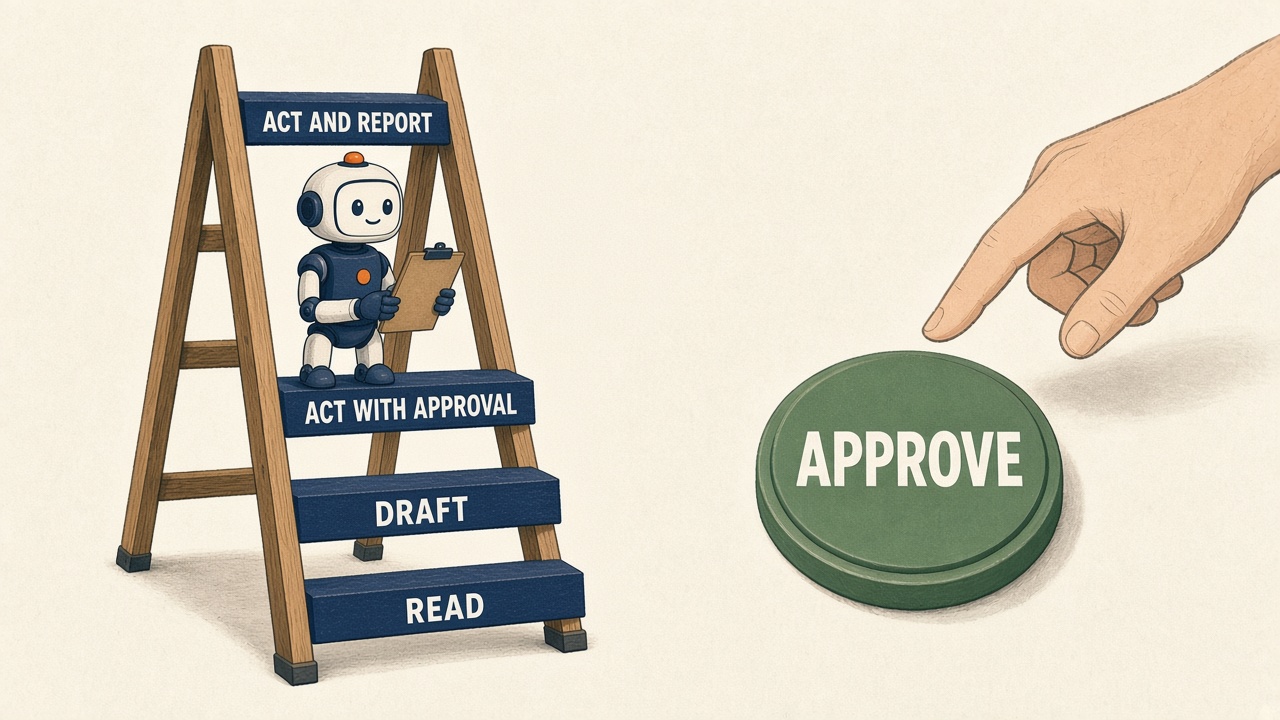
Level 1 is Read. It looks and tells you what it sees. Summarize this lease. What stands out in this rent roll.
Level 2 is Draft. It writes it, you send it. The reply to a tenant, the listing description, the offer letter.
Level 3 is Act with approval. It's ready to do the thing and waits for your yes.
Level 4 is Act and report. It does it and tells you after. None of my bots spend money at this level yet.
Anything that leaves the building stays at level 2 or 3. Messages to customers, money going out, anything public with your name on it. That $500 goal is the one exception I'm working toward, and it's capped and tied to a plan I approved first. I hold that line, and I'd hold it in your business too.
Most jobs should start at 1 or 2. Plenty of them should stay there.
Five guardrails before you move anything up
Least access. Give it only what that one job needs. A bot that reads your rent roll doesn't need your email.
An approval setting for outside actions. Most AI tools that connect to email, calendars or files have a setting that makes it ask before it acts. Turn it on.
A log. You want a list of what it did, when, and why. If your tool doesn't keep a history, have it end every job with a short note.
A fast stop. Know how you'd shut it off in under a minute, before you need to.
A weekly review. Once a week, look at what it got wrong. Turn each miss into a fix: a clearer instruction, a tighter permission, a new check. A job only moves up a level after a stretch with no misses.
Build your ladder in a plain AI chat today
You don't need anything connected to start. Open whatever AI chat you use and paste this:
I run a small business. I'm going to list the jobs I'd like help with. For each one, sort it into a level: 1 Read, 2 Draft, 3 Act with my approval, 4 Act and report to me. Anything that sends a message, spends money, or goes public can only be level 2 or 3. For each job, tell me the lowest level that would still save me time, and what access it would need at that level. Don't suggest anything above level 2 yet.
Then list your jobs: tenant replies, rent reminders, repair requests, bid comparisons, whatever eats your week.
You get your ladder on one page. Most of it will sit at Read and Draft, which is where most of the time savings are.
Next, take one Draft job and run it for real this week. Paste in the tenant email and have your AI write the reply. You read it and you send it. At the end of the week, ask it:
Here are the drafts you wrote this week and what I changed before sending. What should you do differently? Write me a better instruction for this job.
That's your weekly review, and it works in any chat.
Where people get burned
They skip the middle rungs. They go from "it reads my email" to "it answers my email" in one weekend because the demo looked good.
They trust the instruction. They typed "always ask first" and figured that settled it. Then one day it didn't ask.
They never look back. No log, no review, so they don't find the miss until a customer does.
Start this month
Write down every job you'd hand your AI, and give each one a level.
Cap anything that leaves the building at level 2 or 3.
Cut access down to what each job needs.
Turn on the ask-before-acting setting anywhere it's connected.
Know how you'd stop it in under a minute.
Pick one day a week to review the misses and write the fixes.
Move one job up one level, and only after a clean stretch.
That $500 won't come on day one. It gets earned, and even then it stops at the edge of the plan.
So what's the first job in your business you'd let your AI do without asking you, and what would it have to prove first?